


Grammarly-AI Writing Assistant
4.326.34K Reviews
App Specs
- Version
- 2.114.100050
- Updated On
- License
- Free
- Downloads
- 50,000,000+
- Developer
- Grammarly, Inc.
- Categories
- Productivity
- Platform
- Android, iOS
Screenshots
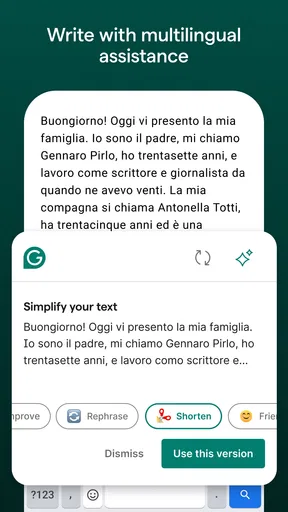
 Analysis by AppCompare
When I’m writing on my phone, the hardest part is often not finding words but noticing when a sentence sounds harsher, vaguer, or less polished than I intended. Grammarly-AI Writing Assistant is built to catch those slips while I type, which makes it most useful as an everyday English proofreader rather than a replacement for my own judgement. I’d recommend it to people who send a lot of messages, emails, or notes in English and want a second pair of eyes close at hand.
The appeal of feedback while you type
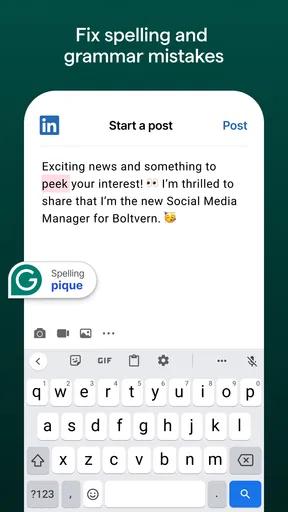
The central idea is simple: corrections appear as I write, so I can deal with an error before it becomes part of a finished message. That is a different rhythm from writing in a blank editor, then copying the whole piece into a separate checker. In short bursts, the immediate feedback can save me a small but meaningful amount of attention.
It is also a useful distinction from a standard phone keyboard’s built-in spellcheck. Basic autocorrect is good at catching familiar misspellings, but it can miss punctuation problems or a sentence that is technically readable yet awkward. Grammarly’s suggestions are aimed at English grammar, spelling, punctuation, vocabulary, and fluency, giving me more to consider than whether a word has been typed correctly.
How I would use it in practice
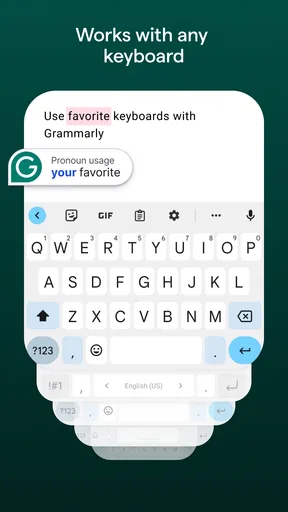
After installing the app and signing in, I can use its keyboard while writing in other apps. That makes it convenient for everyday tasks: replying to a colleague, filling in a form, drafting a message to a landlord, or polishing a note before sending it. The main benefit is not that every sentence becomes brilliant; it is that I have a chance to spot avoidable mistakes without switching between apps.
I would still pause before accepting a suggestion automatically. A checker can identify a likely issue, but it cannot always know whether I meant to sound warm, concise, playful, or firm. If a correction changes the meaning or makes a message feel unlike me, keeping my original wording is the better choice. The tool works best as an editor I consult, not an authority I obey.
When tone matters as much as grammar
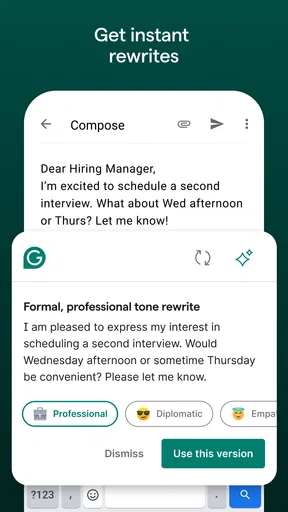
The tone detector is especially relevant for messages where a few words can change how the whole note comes across. If I am writing a request and want to sound friendly rather than abrupt, I can use its feedback as a prompt to reread the sentence. That does not mean the app can know the relationship or history behind a conversation; I still need to judge whether the wording fits the person receiving it.
Personalized writing insights can also help me notice patterns over time. If I keep seeing the same kinds of corrections, that is a practical cue to watch for them in future drafts. I would treat any statistics or comparisons as a reflection tool, not a score of my ability: the useful question is whether I can make my next message clearer, not how I rank against anyone else.
Worth Reading Before You Choose

EA SPORTS FC Mobile 26 Is a Bigger Football Game, but It Takes Time

Flipboard Shows What News Apps Must Do Beyond the Feed

Switching to Android Auto Means Rethinking Your Driving Routine

Google Calendar Makes a Crowded Week Easier to Manage

Ludo King Makes the Most of the Minutes Between Plans

Baby Panda World Brings Quick Play to Modern Phones, but Its Game Library Feels Busy
Where the free option fits
The app is free to start, and that makes it easy to try as a lightweight proofreader before deciding whether its routine place in your writing is worth paying for. Grammarly, Inc. offers in-app purchases, with listed items ranging from $29.99 to $139.99. I would first use the free experience on the kinds of writing I actually do, then decide whether a paid tier addresses a specific need rather than upgrading simply because more tools are available.
That distinction matters because not everyone needs an advanced writing package. If my main concern is catching spelling slips in short messages, the built-in tools on my phone may be enough. If I regularly write longer English texts and want suggestions beyond basic corrections, having feedback in the keyboard can be more convenient than checking each draft elsewhere.
Getting Started with Grammarly-AI
First off, let me tell you how easy it is to get started with Grammarly-AI Writing Assistant. You just download it from the App Store or Google Play, sign up or log in, and bam! You’re ready to roll. The app integrates smoothly with your keyboard, meaning it’s there for you across all your favorite apps. Whether you're texting friends or drafting a formal letter, Grammarly has your back.
What’s super cool is that it doesn’t just correct your spelling and grammar. It offers suggestions on style, tone, and even vocabulary. So, if you’re aiming for a particular vibe or need to impress your boss, Grammarly helps you nail it.
Features That Stand Out
One of the standout features of Grammarly-AI is its real-time feedback. As you type, it highlights errors and provides suggestions on the fly. This instant feedback loop is a lifesaver, especially when you're in the zone and don’t want to break your flow by going back to edit.
The app’s tone detector is another gem. It analyzes your writing to ensure you're conveying the right mood. Trying to sound friendly in an email? Grammarly will let you know if you’re coming off too stiff or formal.
And let’s not forget the personalized insights. Grammarly gives you weekly stats and insights into your writing habits, which is pretty neat. You can see how many words you’ve written, your top mistakes, and even how your vocabulary stacks up against other users.
Why You’ll Love It
Now, let’s talk about why you’ll absolutely love this app. First, it’s like having a personal editor right in your pocket. No more embarrassing typos or awkward phrasing. Plus, the app is designed to learn from you. The more you use it, the better it gets at understanding your style and preferences.
Grammarly-AI also supports multiple English dialects. So, whether you’re writing in British English, American English, or even Australian English, it’s got you covered. It’s like having a writing assistant that gets you and your unique voice.
Is It Worth It?
Alright, let’s get real. Is Grammarly-AI worth the hype? In my opinion, absolutely. Whether you’re a student, professional, or someone who just loves to write, this app is a valuable tool. It helps you write with confidence, clarity, and impact.
Of course, there’s a premium version that unlocks even more features, like advanced style suggestions and plagiarism detection. If you’re serious about writing, it’s worth considering. But even the free version offers a ton of value and can significantly improve your writing game.
Everyday situations where it earns its place
Imagine I am between errands and need to reply to a work email from my phone. I can draft the key points, then use the inline feedback to catch a missing article or clumsy phrase before I send it. For a longer message, I might write the main thought first, check the suggestions, and then read the whole thing once without looking at the highlights. That final pass helps me hear whether the email still sounds like me instead of a string of accepted corrections.
For students, it can be handy when polishing an English-language discussion post or a short assignment draft, especially when the goal is to catch recurring grammar and punctuation slips. It is less suited to doing the thinking for you: an editor can help make an argument easier to read, but it cannot supply the evidence or decide whether the reasoning is sound. I would use it after drafting, not as a shortcut around planning and revision.
People who write across more than one English variety may also appreciate being able to work in a preferred dialect. That can reduce the annoyance of seeing a familiar spelling treated as an error, but I would still check the audience and context. A workplace, course, or publication may have its own style expectations, and a keyboard setting cannot make that decision on my behalf.
What it does not replace
Compared with using a basic system keyboard alone, Grammarly gives more attention to sentence-level wording and possible clarity issues. Compared with opening a separate writing editor, its advantage is that feedback is close to where I am already composing. The trade-off is that a keyboard-based checker is not the same as sitting down with a full document and reviewing its structure, argument, or organization. For a report or article, I would still want to read the complete text in context.
It is also not a substitute for a human reader when the stakes are high. A sensitive apology, a job application, or a message about a complicated disagreement may need tact that depends on context beyond the words on screen. I can use suggestions to catch mechanical distractions, then make the final call myself. If I need deep editing, subject expertise, or a second person’s understanding of the situation, a proofreading keyboard cannot provide that.
One practical habit is to avoid accepting every change in a rush. Read the complete sentence after applying a correction, particularly when a suggestion affects word choice or tone. On a small phone screen, it is easy to focus on a highlighted fragment and miss how it sounds with the sentence around it. That quick reread is the difference between using assistance thoughtfully and letting an automated nudge rewrite my voice.
Who is likely to benefit most
I think the strongest fit is someone who writes English regularly on a phone and wants discreet, immediate proofreading across everyday messages. That could be a student checking short drafts, a professional responding between meetings, or anyone who is confident about their ideas but less sure about punctuation and phrasing. The app has an Everyone age rating, and it has reached more than 50 million installs, with a 4.2 average from around 257,000 ratings. Those figures suggest broad use, though they do not tell me whether its particular style of feedback will suit an individual writer.
I would be more cautious about recommending it to someone who rarely writes in English, dislikes using a third-party keyboard, or prefers to compose offline in a dedicated editor. It may also feel distracting to writers who already have a deliberate editing routine and do not want suggestions appearing as they type. In those cases, a plain spellchecker or a separate final proofreading pass may be a better match.
The app’s current version is 2.101.56876, and it runs on Android 10 or later. It was released on December 11, 2017, and the large number of user reviews—around 26,000—offers plenty of public feedback to consider alongside your own trial. I would judge it by trying a few real messages, not by assuming that a popular writing aid automatically fits every workflow.
Final Thoughts
To wrap things up, Grammarly-AI Writing Assistant is a must-have app for anyone looking to enhance their writing skills. It’s intuitive, effective, and just plain helpful. Whether you’re typing up a quick text or crafting a long-form article, Grammarly empowers you to communicate with precision and flair. So, give it a try and watch your writing transform from good to great!
My recommendation is a little more measured: it is a useful companion when I want quick English-language feedback, but it is not a replacement for careful reading or a human editor. I would start with the free option, see whether the keyboard feels natural in my daily writing, and only consider an in-app purchase if I can point to a feature I genuinely need. Used that way, it can make routine writing clearer without taking the writer out of the process.
Pros
- Improves grammar and style effectively.
- Offers real-time writing suggestions.
- Seamlessly integrates with browsers.
- Supports multiple document formats.
- User-friendly interface for easy navigation.
Cons
- Requires internet for full functionality.
- Premium features are subscription-based.
- Can be overly critical at times.
- Not all suggestions fit every context.
- Occasional lag in processing large texts.
FAQs for Grammarly-AI Writing Assistant
What platforms is Grammarly available on?
Grammarly is available on multiple platforms, including web browsers like Chrome, Firefox, Safari, and Edge through its browser extension. It also offers desktop applications for both Windows and macOS, as well as mobile apps for Android and iOS devices. This ensures seamless integration across your devices, allowing you to enhance your writing anywhere.
Is Grammarly suitable for professional use?
Yes, Grammarly is designed to support professional writing with advanced features such as style suggestions, tone detection, and vocabulary enhancements. It can help professionals in various fields, from legal to academic writing, by ensuring clarity, precision, and correctness in their documents. The premium version offers even more tools for in-depth writing assistance.
Does Grammarly offer real-time writing suggestions?
Grammarly provides real-time writing suggestions, which means as you type, it highlights potential errors and improvements. This feature helps users to immediately correct grammar, spelling, and punctuation mistakes, and also suggests enhancements for sentence structure and vocabulary, improving the overall quality of your writing on the spot.
Is my data secure with Grammarly?
Grammarly takes data security seriously and implements strong security measures to protect user information. It uses encryption to safeguard your data and adheres to privacy standards to ensure your writing and personal information are kept confidential. Users can review Grammarly's privacy policy for detailed information on data handling practices.
What are the differences between Grammarly's free and premium versions?
Grammarly's free version offers basic grammar and spelling checks, which are sufficient for everyday writing. However, the premium version provides advanced features like style and vocabulary suggestions, clarity improvements, tone detection, and plagiarism detection. These additional tools are beneficial for users who require more comprehensive writing assistance.


